[BNB] Instant Confirmation / Pending Confirmation: How to Set Up
You can choose, for each property, whether incoming bookings are confirmed immediately or confirmed only after you review and approve them. This setting is available for BNB products.
1. What is the difference between "Instant Confirmation" and "Pending Confirmation"?
Confirmation type |
Description |
|---|---|
✅ Instant Confirmation |
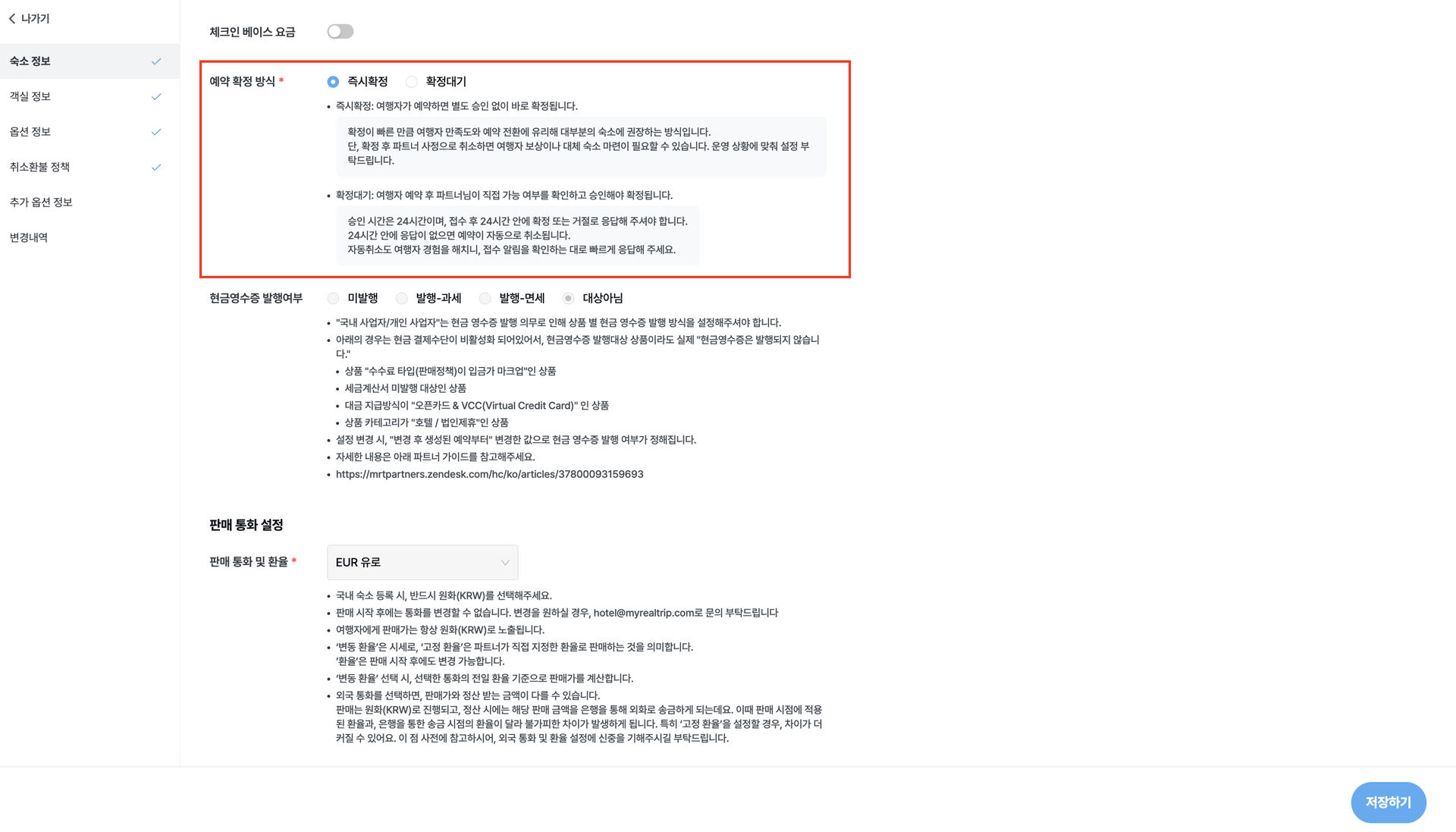
When a traveler makes a booking, it is confirmed immediately without any action on your part. Travelers prefer this because there is no waiting, which also means a higher chance of converting a booking request into a confirmed booking. Please note that if you cancel a booking that has already been confirmed for reasons on your end, you may be required to compensate the traveler or arrange alternative accommodation. |
⏳ Pending Confirmation |
When a traveler submits a booking request, the booking is only confirmed after you review and approve it. You must approve the request within 24 hours of it being submitted. If 24 hours pass without approval, the booking is automatically cancelled. Please check your booking notifications and respond as quickly as possible. |
2. How to configure the setting
Step 1. Open the settings
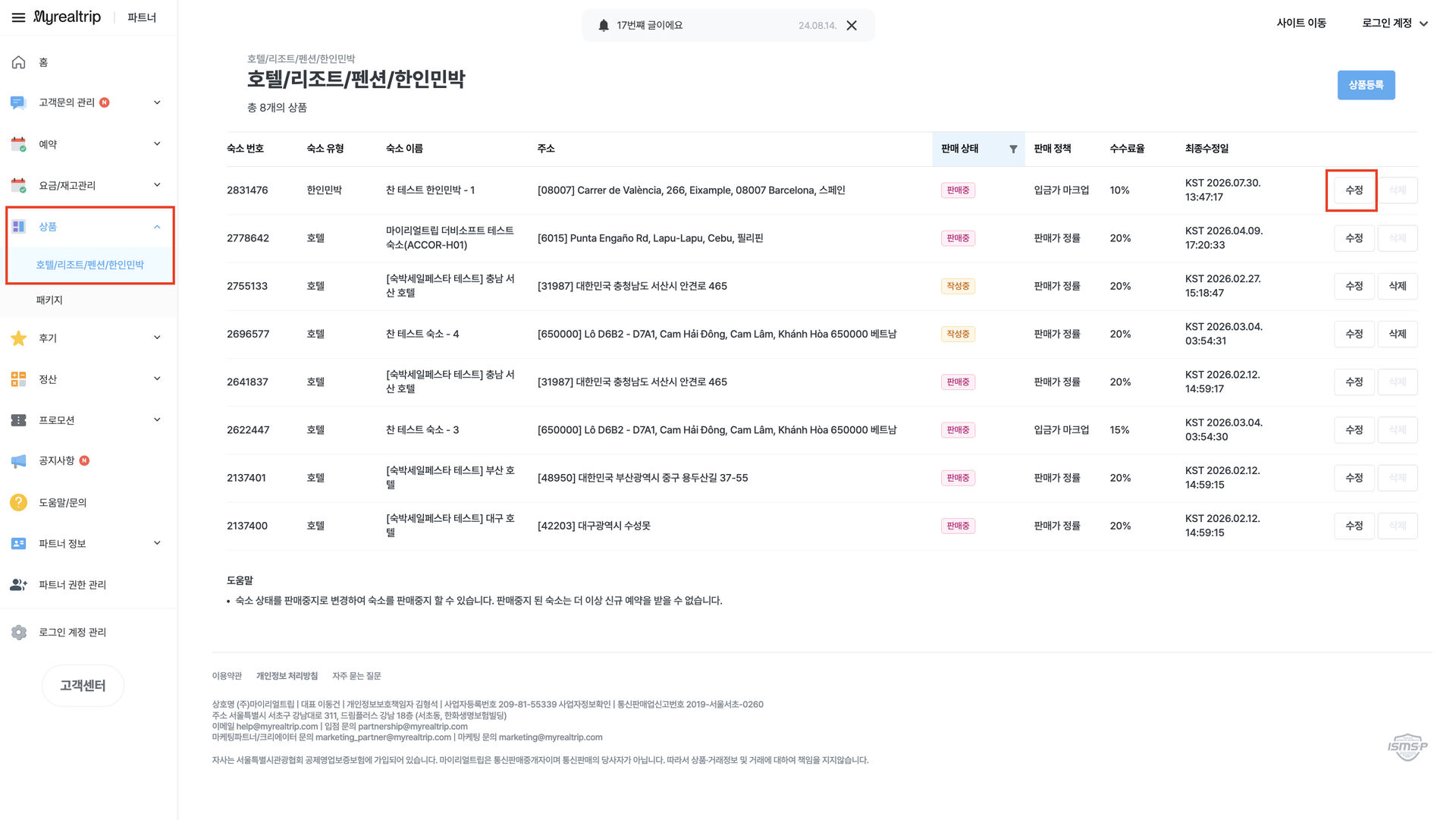
In the Partner page, follow this path:
[Products] → [Edit] for the property you want → [Property Information] → [Basic Information]. Scroll down the page and you will find the setting directly below "Check-in Base Rate".
Step 2. Choose a confirmation type
Select either "Instant Confirmation" or "Pending Confirmation". You can only choose one.
Question |
Answer |
|---|---|
Is a selection required? |
Yes. When registering a property, you must select one of the two options. |
Can the approval time be changed? |
The approval window for "Pending Confirmation" is fixed at 24 hours and cannot be changed by partners. |
Step 3. Save
Press [Save] and the setting takes effect immediately.
You can switch between "Instant Confirmation" and "Pending Confirmation" at any time, and the change applies right away.
3. Instant Confirmation Club benefits
Properties set to "Instant Confirmation" that have a host-initiated cancellation rate below 10% over the past 3 months are automatically enrolled in the "Instant Confirmation Club" and receive a preferential fee of 13%. (Properties not in the Club are subject to the standard fee of 14%.)
The fee applies at the property (product) level, not at the partner level.
Club eligibility is reviewed and renewed on the 1st of each month.
The fee rates above include VAT and card processing fees.
For more details, please refer to "[Notice] BNB Fee Structure Update and Expanded Partner Support".
How to contact the Partner Support Center
Inquiries previously handled through the KakaoTalk channel have been consolidated into the Partner Support Center.
① Submit via live chat
Click here to select your inquiry type and be routed automatically to the relevant team.
② Submit via the Partner page
Log in to the Partner page, then click the [Customer Support] button at the bottom left of the screen to open the inquiry form immediately.
Support hours: Weekdays 09:00-18:00 (excluding weekends and Korean public holidays) · Inquiries received outside support hours will be answered in order on the next business day.